Plenix 2026.10.67 — Side conversations and ticket reminders
Email a supplier or another team straight from a ticket without the customer seeing it. Replies thread back onto the ticket, the ticket can wait for their answer and pick up where it left off, and private reminders bring a ticket back to you at the time you pick or sooner when someone replies.
T
The Plenix Team·22 October 2026·2 min read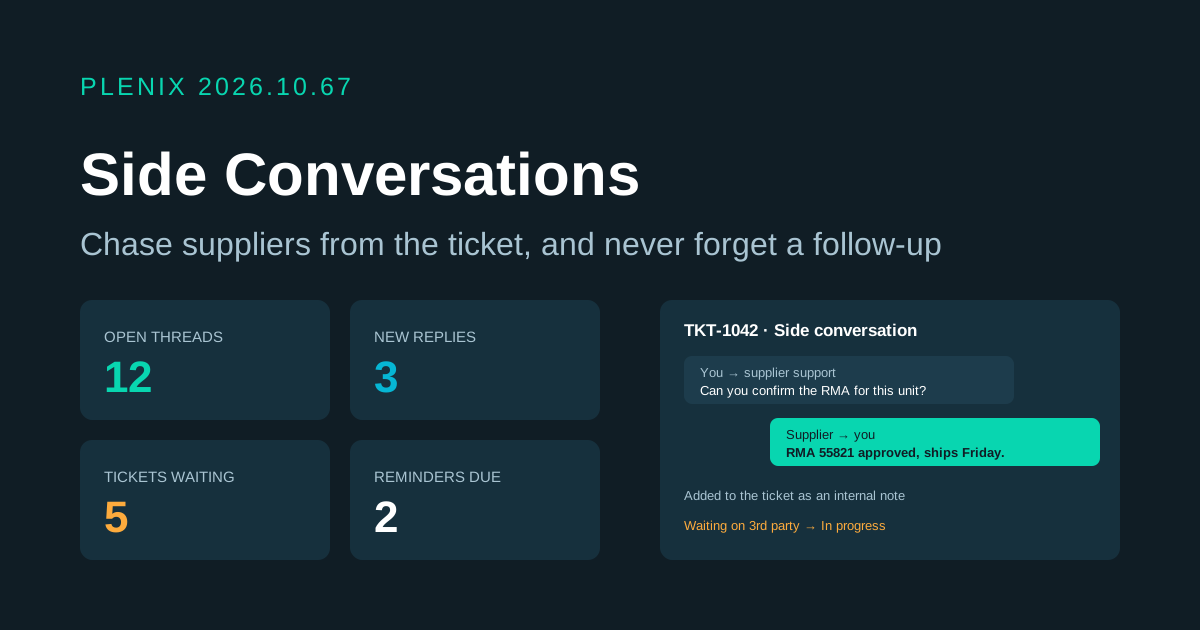
Release 2026.10.67 adds side conversations and ticket reminders to Ticketing, plus a new Follow-ups page (Ticketing → Follow-ups). They come with the Ticketing module. Plans and prices have not changed.
New features
- Side conversations. Start an email thread from any ticket with a supplier, a vendor's support desk or another team, separate from the reply to the customer. The customer never sees it. Pick who it goes to (up to 10 addresses in To and 10 in Cc), which of your mailboxes it is sent from, and whether to include the ticket description or the latest message so the other side has the background.
- Replies come back to the ticket. Answers are matched to the right thread automatically and added to the ticket as an internal note. The people assigned to the ticket, and whoever started the thread, are told straight away and can open the thread from the notification.
- Wait for a third party. Tick "Set the ticket to Waiting on 3rd party until they reply" and the ticket waits on them. When they answer, it goes back to the status it had before, so it shows up in the right queue again with no manual step.
- Ticket reminders. Ask a ticket to remind you at a time you pick: in an hour, in 4 hours, tomorrow at 9:00, in 3 days, next Monday, or any date and time up to a year ahead, with an optional note. Reminders are private to you. You can also have one wake you sooner if the customer replies or a side conversation gets an answer.
- Follow-ups page. Every side conversation across your tickets in one place, with tabs for open threads, new replies, threads a ticket is waiting on, threads you started and closed ones, plus search. Next to it, your own reminders: upcoming, due now and done, with snooze, done and cancel.
Improvements
- Ticket page. Each ticket now has Side conversations and My reminders sections. They show the ticket's threads with new replies marked and let you reply, close or reopen a thread, and set or change your reminders without leaving the ticket.