Plenix 2026.10.68 — Weekly timesheets with approvals
Fill in a whole week of time in one grid, hand it in with a note and get it approved by your line manager or the project's owner. Managers see who has not handed in and their team's utilisation, and project owners see the approved billable time still to invoice.
T
The Plenix Team·23 October 2026·3 min read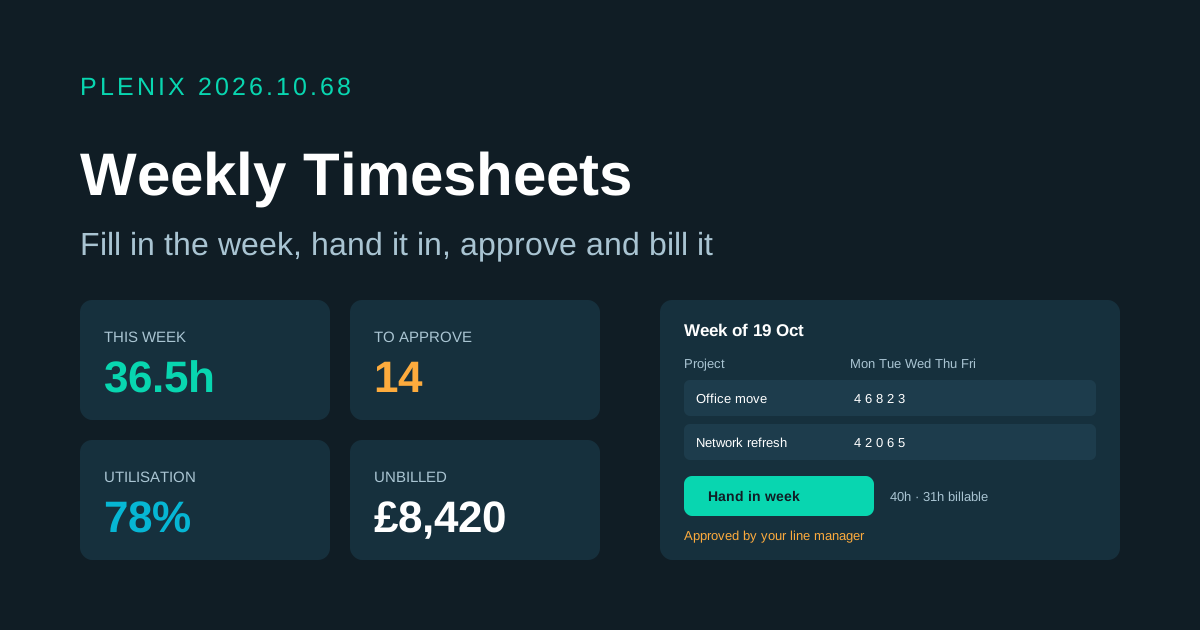
Release 2026.10.68 turns ERP → Timesheets into a full timesheet hub: a weekly grid, hand-in and approval, a team view, unbilled time and workspace settings. It comes with the ERP module. Plans and prices have not changed.
New features
- Weekly grid. Log a whole week at once: one row per project (and task, if you want), a billable switch and a description, with an hours box for each day. Day and week totals update as you type, and a day over the workspace's daily limit is flagged before you save.
- Quick start. "Add row" suggests what you logged last week and the projects you are staffed on. "Copy last week's rows" brings back last week's projects and tasks so you only fill in the hours.
- Hand in your week. Save as you go, then hand the week in with an optional note for your approver. If you spot a mistake, take it back and hand it in again, as long as it has not been approved yet.
- Approvals. Time waiting for you is grouped by person and week. Approve a whole week, pick individual entries or select everything. Sending time back needs a reason, which the person sees on the row so they know what to fix. People are told when their time is approved or sent back.
- Team view. Line managers, project owners and admins see everyone's logged, expected and billable hours, utilisation and whether the week is handed in, for this week or the last 4 or 12 weeks. Filter to the people who have not handed in, and open a direct report's week straight from their name.
- Unbilled time. Approved billable hours not yet invoiced, by project and client, with their value at the project's hourly rate, how long they have waited and a link to the project's billing tab. Projects without a rate are called out.
- Reminders. People whose previous week is not handed in get a reminder at the day and hour you choose (UK time). Approvers get a weekday-morning nudge when time has waited more than two days.
- Settings. Admins choose the first day of the week, expected hours, the most hours allowed in a day, whether a description is required, who approves, the reminders, and a lock date.
Improvements
- Lock date. Once payroll or invoicing for a period has closed, lock it: time on or before that date can no longer be added, changed, approved or sent back.
- All time entries. The previous Timesheets list is still there under Timesheets → All time entries, now with draft and billable filters, and errors are shown instead of failing silently.
- Links. Project detail pages open on the tab a link asks for, so Unbilled goes straight to a project's billing plan.
Changes
- Who approves. Approval now defaults to managers: admins, the project's owner, manager or leader, and the person's line manager. Admins can switch it to "anyone except the person who logged the time".
- Approvals undo cleanly. Sending back time that was already approved takes its cost off the project budget and removes its payroll copy. Time that has been invoiced, or already paid in a payroll run, cannot be sent back.
Fixes
- Approving the same time twice no longer counts it against the project budget twice.
- New time can no longer be created as already approved.
- People can no longer change or delete someone else's time.
- Hours are checked: between 0 and 24, in quarter hours, and within the daily limit.