Plenix 2026.10.42 — Knowledge: a team wiki with spaces, a rich editor, comments, history and sharing
Knowledge gives your team one place to write things down: how-tos, runbooks, policies, meeting notes and client handbooks. Organise pages into spaces and nested trees, write with a fast editor that links to your Plenix records, review on a schedule so nothing goes stale, and share a read-only page with anyone by link.
T
The Plenix Team·15 October 2026·4 min read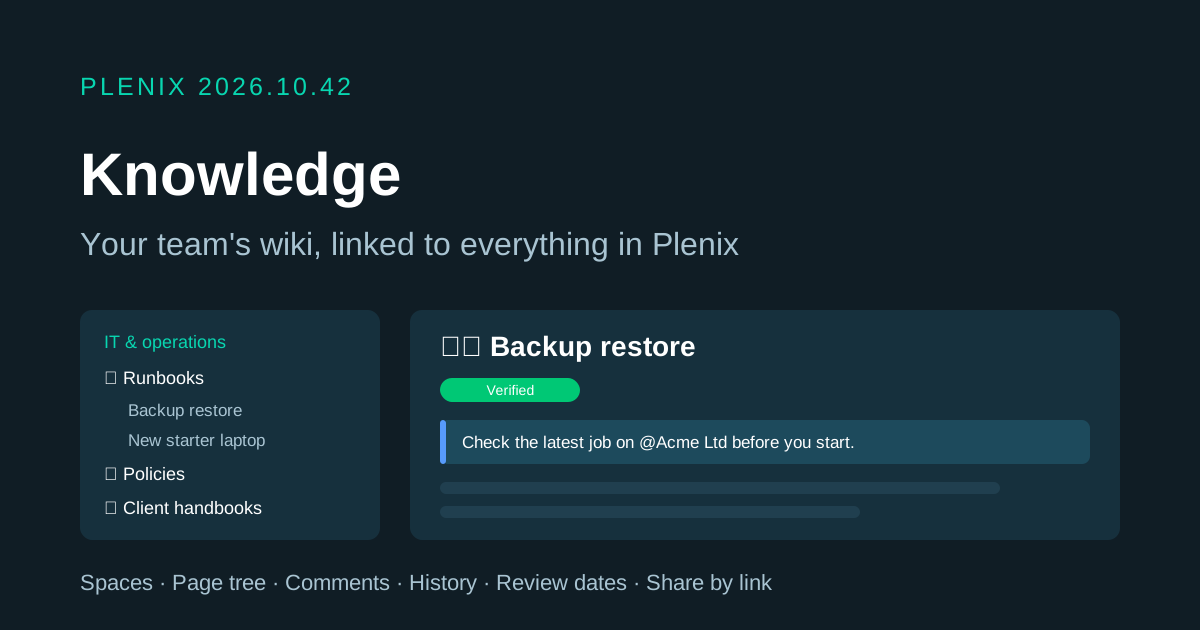
Release 2026.10.42 brings Knowledge to Plenix (Knowledge, just below Documents in the sidebar). It is a wiki for your whole team. Knowledge comes with Documents on every plan that includes it. Plans and prices have not changed.
New features
- Spaces for each team or topic. Make a space for IT, HR, sales, a client or a project. A space can be open to everyone in your workspace or private to the people you invite. Members can be owners, editors or viewers. Each new space starts with a home page you can fill in straight away.
- A page tree as deep as you need. Nest pages under other pages and drag them to reorder or move them. You can also move a page to another space, or duplicate it along with its attachments.
- A writing editor that keeps out of your way. Type
/to add headings, lists, to-do lists, quotes, code blocks, tables, callouts, toggles, a table of contents or a list of sub-pages. Paste or drop images straight in, and attach files for download. Select text to format it, link it or comment on it. Changes save as you type. - Links to everything in Plenix. Type
@to mention a colleague, link another page, or link a record such as a company, contact, deal, lead, project, ticket, work order, invoice or employee. You can also embed a live Work Board in a page. Each page shows which other pages link to it. - 14 templates. Start a page from meeting notes, how-to guide, runbook, SOP, project brief, decision record, onboarding guide, retrospective, incident postmortem, requirements, policy, client handbook, 1:1 or knowledge base article, or start from an empty page.
- Comments and discussions. Comment on a whole page or on a highlighted passage, reply in threads and mark threads resolved. The page owner and everyone in a thread are notified of new replies, and anyone you @mention in a page is told about it.
- Full version history. Every save is kept: up to 200 versions per page, plus any number of named versions you choose to keep. Compare any two versions, view an old one, or restore it.
- Page owners and review dates. Give a page an owner and a review cycle. When the review date passes, the page shows a "review due" notice and the owner gets a reminder. Marking it verified starts the cycle again.
- Share a page by link. Turn on a read-only public link for any page. Readers get a clean page with a contents list, a Markdown download and a print-friendly layout. They don't need an account. You can switch a link off or make a new one at any time, and the old link stops working straight away.
- Search across every page. Search page titles and page text across every space you can see.
Improvements
- The Knowledge hub shows your favourites, recently viewed and updated pages, pages due for review, your spaces and the template gallery. Each figure at the top opens the list behind it.
- Working together. You can see when a colleague has the same page open. If someone else saves while you are editing, Plenix tells you, and you can keep your version or load theirs, so neither change is lost without warning.
- Lock, archive and restore. Lock a finished page to stop accidental edits. You can archive pages or whole spaces and restore them later.
- Export to Markdown. Download any page as a Markdown file.
- Work Boards colours. Some highlight and label colours in Work Boards, on the public intake form and on several operations screens were not showing. They now display correctly.
Security
- Private spaces are only visible to their members. You can restrict a single page and everything under it to named people, even inside an open space. Search, @mentions, links and page lists only show pages the reader is allowed to see.
- Public page links are read-only and limited in how often they can be opened. They only show that one page and its own images and files.
- Uploaded files are size-limited and checked for executables.
- Record pickers now respect module access. In Work Boards and Knowledge, the search for a record to link now only lists records from modules you have access to. For example, people without CRM access can no longer search companies or contacts from a board column.
- Partner portal links are now handled correctly by the permission system.