Plenix 2026.10.61 — Benefits: plans, enrolment windows, life events and total rewards statements
HCM gets a benefits hub. Set up plans such as health cover, pension and cycle to work, each with levels of cover and rules for who can join. People choose or turn plans down in an enrolment window, when they start, or after a life event. Active cover feeds a monthly payroll deductions list, and everyone gets a total rewards statement.
T
The Plenix Team·21 October 2026·4 min read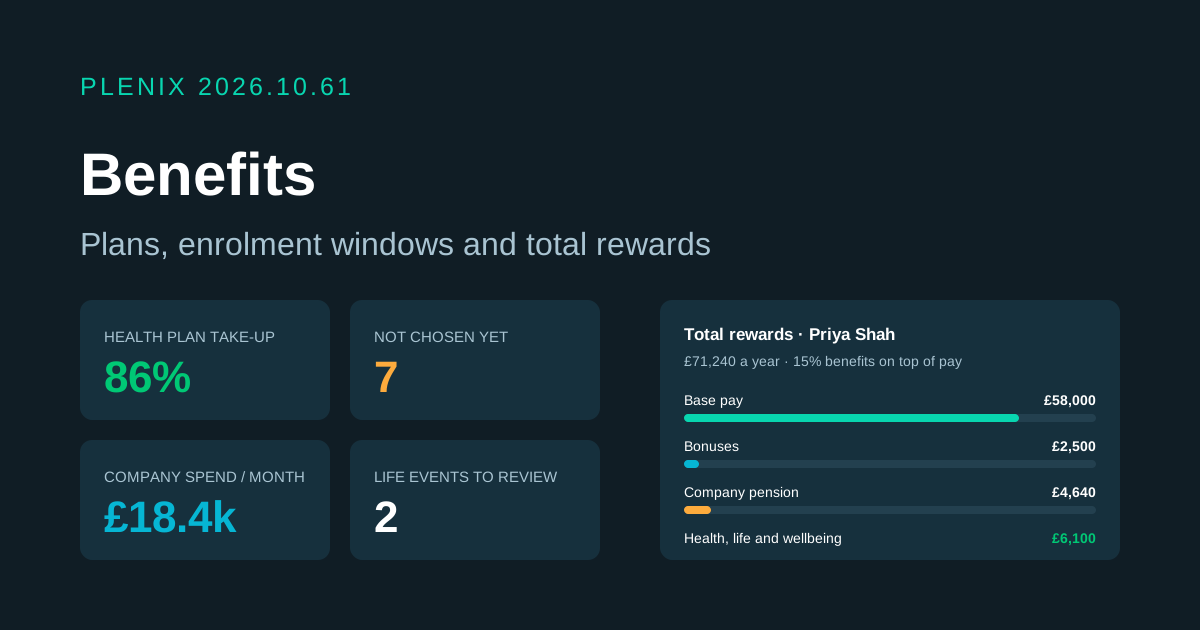
Release 2026.10.61 adds Benefits (HCM → Benefits in the sidebar). Benefits is part of the HCM module, so it comes with the Business and Enterprise plans. Plans and prices have not changed.
New features
- Benefit plans. Set up health, dental, vision, life cover, income protection, pension, wellbeing, car, childcare, cycle to work or any other plan. Each plan has up to eight levels of cover (for example "Just me", "Me and partner", "Family"). Price each level as a fixed monthly amount or as a share of pay, with the employee and company parts set separately.
- Who can join. Limit a plan by department, branch, employment type or length of service, and add or leave out named people. Plans can have a waiting period before cover starts, cover dependants up to a limit you set, and link to the plan document.
- Enrolment windows. Open a window for one or more plans, such as a yearly open enrolment, with its own dates and a date when the new cover starts. Windows open and close by themselves on their dates. Everyone affected is told when a window opens, and people who have not chosen are reminded three days before it closes.
- Choices made by people themselves. Under My benefits, everyone sees the plans they can join, what each level costs them each month and what the company adds. They choose a level, add dependants, or turn a plan down if it allows that. People can also choose when they start (30 days by default) and after an approved life event.
- Life events. People report a marriage, birth, adoption, divorce, lost cover, a move or another change. When HR approves it, the person gets a set number of days to change their benefits (30 by default), with cover starting from the date of the event.
- Approval when you want it. Choices can start straight away or wait for HR. HR can approve, decline with a note, enrol someone directly with a start date, or end cover.
- Auto-enrolment. Mark a plan as auto-enrol and everyone eligible is put on its first level once any waiting period is over, and told. If the plan allows it, they can opt out from My benefits.
- Payroll deductions. A monthly list of what each person pays and what the company pays for every plan in force that month, with part months marked. Export it for payroll.
- Total rewards statement. Every employee can see and print a statement of base pay, bonuses from the last 12 months, company pension contributions and what the company spends on their benefits, with the share each one makes up.
Improvements
- Plan pages. Each plan has its own page with its members, filters by status, a member export, and the list of eligible people who have not chosen yet. Click a person to see their choices and enrol them.
- Analytics. See participation for each plan (enrolled out of eligible), people who turned plans down, monthly company and employee cost by plan, category and department, and the trend by month. Every number opens the people behind it.
- Starting and ending cover by itself. Cover that is due starts on its date and cover past its end date ends. A new choice on a plan ends the old one the day before. When someone leaves, their cover ends and choices that had not started are withdrawn.
- Hourly staff. Shares of pay for hourly staff are worked out from their hourly rate and the yearly hours you set (1,950 by default).
- Automations. Workflow rules can react to benefit choices and life events.
- Older records kept. Benefit records from before this release are still available from the hub.
Security
- Private by default. A person's choices, dependants, life events and statement are seen only by them and HR. Only HR sees plan members, deductions and analytics. You choose whether employees see what the company pays.